Assisted/Automated Landing – Designing the Systems

Ehsan’s blog post wishing for assisted landings on mozilla-central started a lot of people talking about this being a very desirable and useful tool for developers, where they could set a flag in Bugzilla and then be free to do other work until the results of their push were posted back to the bug. As part of enhancing the Tryserver I was already working on a way for users to signify in their try-syntax that the results of the push should go to the bug and these two ideas started to fuse into a dreamworld where someone could attach a patch to Bugzilla and have it be tried and pushed to trunk all with some magical bot automation.

After doing a very short survey of developers and their try usage I have observed that there are two very different stakeholders here and both of them need separate-but-related tools:

Developers The Bot (automation)
  • ease of use
  • better reporting (less email anyone?)
  • option to post to bug(s) *after* a try run has indicated success
  • queuing of patches culled from a flag in Bugzilla
  • automatically apply to tip of repo
  • push, and report back with results

After soaking in the survey feedback and a first attempt with a whiteboard yesterday, I woke up this morning with some clearer ideas on how to take a first run at creating this system.  It involves creating several new tools, one new database, and enhancing our existing buildapi.

New tools for Developers:

  • Adding more Try syntax options:
    • include list of the bug(s) that you would like your try results posted to (however many make for a complete run on your push, this can be one linux build or a complete ~186 builder try: -a buildset) 
    • turn off email notifications
  • Adding functionality to the self-serve api view for a revision (eg: https://build.mozilla.org/buildapi/self-serve/try/rev/de8ea75bc48e) that will better show your results for that push and provide a button which will post the patch(es) to a specified bug
  • Auto-landing from a bug in Bugzilla using the [autoland-try] whiteboard tag where any attached patches which are not obsolete, and have nothing set for ‘r’ are applied to the current tip of mozilla-central, pushed to try and those results are returned to a comment in the bug

New tools to Automate landings (bot or script):

  • Crawl Bugzilla for bugs where [autoland-$branchname] is in the whiteboard and automatically push to tip of named branch, get the results, and return them to a comment in the bug (stripping out the whiteboard tag on completion)
    • bot will grab all non-obsolete, r+ patches (if $branchname != ‘try’) 
    • interdependent bugs will not be handled in this first swipe at a working system
    • pushes will have autoland-$bugnumber as the reason for the build in schedulerdb so that the results can be watched for, aggregated, and reposted to the bug on completion
  • Watch results coming back for one or two oranges (we can set a threshold) and re-triggers those, watching for the second set of results – to attempt catching intermittent oranges
  • Backout patches where even with a rebuild on an orange, there still remain orange results
  • LDAP authentication checking for bugzilla patch author -> hg commit permissions and being able to ensure that only people with the right credentials can trigger automatic landings. This may mean checking the reviewer too before allowing a patch to be applied & pushed.

The next step is to get this design organized into bugs so that we can parcel out the work involved and start testing/completing segments and features as we work towards the whole. We have a RelEng intern this summer, Marc Jessome (Another Canadian in RelEng!), who will be doing a lot of the work between now and the end of August. Stop by anytime to say “Hi” to Marc and to chat with either of us about the project – feedback is always appreciated.  I’m happy to say that 52 people filled out the Try Usage survey just from posting it on Yammer. That was super helpful, thank you.

A PyStar Supernova in the Sky

The first Bay Area PyStar event has come and gone. I’m finally getting a moment to regroup and ponder all the trial and error of being the organizer of this event as well as having time to look at some of the statistics we gathered. Just from an organizing perspective here are a few items I’d like to share about the process.

Things to do differently next time:
* When creating the Eventbrite event, add questions like “What level do you want to learn at?” “Meat or Vegetarian?” “Operating System?” to the registration so there’s no need to send out blanket emails to attendees to try and get that information after the sign up.
* Only do one day workshop instead of Friday night installation and Saturday workshop. I think that for many people the setup could have been done in the first hour and the rest of the day been spent learning instead of having a night session that only is needed by a handful of people.
* Have the teachers/assistants already assigned to a particular level of instruction – prepare topics, tutorial materials, and class size ahead of time so that on the day of the workshop there might only be a handful of late arrivals to place and the other attendees will already be set up in the right learning level as requested in the sign up. 

Things that really worked this time:
* Eventbrite! They have amazing tools, stats, emailing options, charts, and also a way to see where your sign ups come from which showed us that we got a TON of views from Tweets which apparently was an impressive number (I am told by one of our attendees who is an Eventbrite employee)
* Mozilla! By sponsoring the event – providing the space and food – being able to let people/groups spread out and work in our various conference rooms as well as having lunch on site was very much appreciated by attendees (and of course by me!)
* CodeChix!  This peninsula-based group of women coders accounted for 30% of our attendance and also netted some teacher/assistants for the workshop. CodeChix co-sponsored the event and helped get word out as well

Attendance
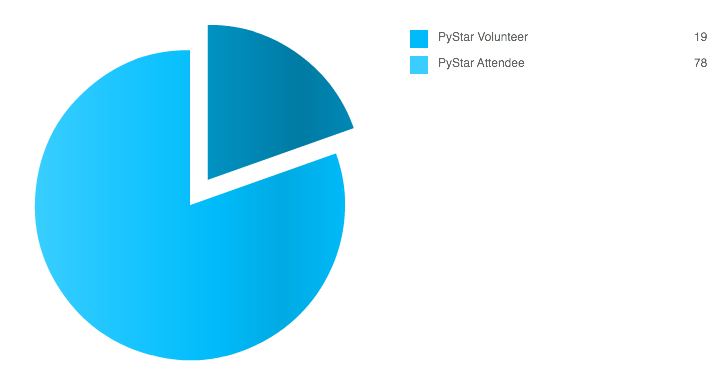
There was something odd happening with the Eventbrite signups. In a couple of short bursts, a ton of tickets were being snatched up by names that seemed slightly suspicious. Now the event has passed and I’ve checked in all the attendees as well as accounted for the no-shows (almost all of whom took a moment to send in their regrets so the tickets could be freed up for another person – very sweet!). It looks to me like about 40% of our attendees were fake accounts. Julie (who works at Eventbrite) and I took a look at the numbers and she’s kindly offered to look into it further to see if there is indeed something fishy happening. All that aside, we had 47 people! That feels like great attendance to a first workshop, on a Saturday, in Mountain View.

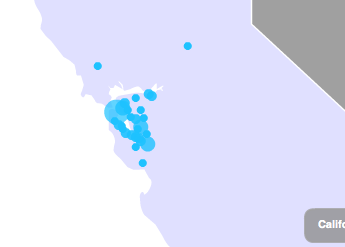
Speaking of Mountain View – we had attendees come from all over Northern California. I love this view of how spread out geographically we all were:

This graph is useful for seeing how my own promotion attempts were successful.  The original spike of page views is obviously when I first announce the event link. CodeChix, Baypiggies, and Devchix were the mailing lists I sent emails to with the link. While that got the ball rolling, it was the tweets and emails sent out almost 3 weeks later – a week before the event where the event got lots of attention.  It probably helped that PyStar Minneapolis was happening then too so #PyStar got lots of tweets (sorry to the person who’s twitter nick is @pystar).

Can I just say that I am so thrilled with the amount of people who volunteered to teach/assist?  Seriously. Amazing. I love that there are people out there who really enjoy getting newbies involved, who can share their skills, and who will give their time to events that grow community.

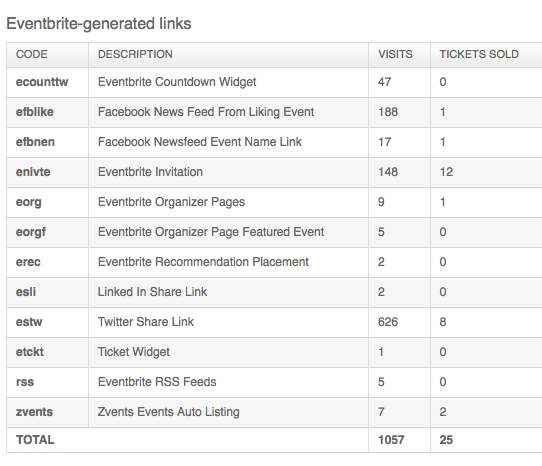
Finally, here’s a breakdown of where we got ticket “sales” from via Eventbrite. This is another reason they rock – they help you promote your event!  As you can see here the Twitter share link definitely got us the most eyes even though direct invitation resulted in more actual signups. For next time I would send the link to a few more mailing lists like SF Python Meetup, Systers, and also next time we’ll be able to invite the folks who came to the first one as well as those who couldn’t make it.

In follow-up posts I will post and analyze some of the survey results of both the PyStar Bay Area and the PyStar Minneapolis. I need to go learn how to create charts from Google doc spreadsheets. Also we need to figure out how to set up our site and materials to be easily updated and adjusted by a distributed team without having to break off into separate sites.  Finally, the curriculum needs an overhaul. We kept an etherpad during the event to track issues so that I can go through post-workshop and take advantage of all the feedback to improve our offerings.

What’s Next?
The next PyStar I plan to organize will be in late July or early August and I’d like to do that one in SF.  Following that I’m going to plan one in Toronto for mid-to-late October.  What we did this past Saturday is only the beginning. I’ll be working with all the folks in the pystar group to get this program shaped up into a much more modular system for learning Python and Django in stages (badges) and also will be setting up sub-groups for things like hack nights, code-masters (think toastmasters but writing code in front of people), and I have this idea of taking the PyStar lessons into women’s prisons as a way to get marketable skills into the hands of people who need them badly.

Anyway, first we’ll get more material prepared and digest/incorporate all the excellent feedback. Then we can take over the world 🙂

I hope I’ll see you at future events. Thanks to everyone who helped make this a great day!

Captain Destructo Breaks Everything

Alternate title ideas: “It’s not all s/Tryserver/Try”  or “What I should have done, and didn’t”

I bet you get the point by now. Today I caused a fairly lengthy, unnecessary downtime on Try.  Now that I’m writing this, things are under control again and there’s a few small niggly bits left but nothing that will keep me up at night.

It all started with a bug about graphserver posts from tests not getting through because they were looking for MozillaTry (the tinderbox name for Try) but instead the graphserver only knew about Tryserver (the branch name for Try) and nothing was using Try (except the repo for Try) which is what it ought to have been doing in the first place.

Now that I’ve been adding a lot of project branches in a short amount of time, certain things have become more streamlined and so I felt that the best option was to go through and rename Tryserver/MozillaTry to Try everywhere so that from the repo going forward, everything was the same. This has been working extremely well for our project branches and helps make setup a snap.

Here’s where it gets all broken. I approached this bug with a quick swipe at this problem was superficial and ended up causing some preventable burning.  I shall now list for you (and future me) what I did and what I should have done:

Did:

  • hg rename on configs for desktop
  • branch configs for s/tryserver/try
  • updated graphserver branch name to Try
  • a quick downtime window from 10am – 12pm in order to prevent builds from getting split into two different upload dirs

Should have done:

  • hg rename on configs for mobile
  • grep of buildbotcustom for “tryserver” as we have special casing for it in several files
  • log uploader and post_upload scripts to make sure everything about the try build was going to the right place
  • updated the dir permissions on ftp for the new upload location and ensure that the archive is on nfs mount
  • edited cronjobs on staging to catch the new try builds
  • updated graphserver machines table for each try platform’s builder name
  • more notice for downtime, with a 4 hour window that would have allowed a test push to make sure everything was wired up correctly  
  • updated the treeclosure hook to include the new tinderbox page

Some of the things I should have done didn’t have an impact on the burning/try closure but it’s fair to say that if I had done a staging round of all my plans first I would have caught more of the obvious things that I missed. I would have then planned the downtime better and been prepared to ensure the disturbance would have been minimal since this was, after all, a really low priority bug.

Aki told me that he had a manager who said “you don’t learn til you break something”.  Well I broke everything try-related today and here’s hoping that I have learned something because the stress of this whole day is not something I want to experience often. It’s that feeling you get when you realize you’ve started something that you can’t back out of and there’s no way to go but forward, even though everything in front of you now appears hopeless and messy.

So here’s some lessons to take away:

  1. Staging is not to be underestimated even for just renaming things that are already working
  2. Taking the time to search with grep/mxr and find the terms you are replacing before starting the upgrade in production will help find wiring you might have overlooked in your preparations
  3. Prepare more thoroughly and have a clear idea of the env. you started in and what it will take to have that env. back when you’re done. Leaving dangly bits is not ideal.

Happy Friday.
(and many thanks to Aki)