0.1 Release

Here’s what we’re looking at.

I built a version of ff that was checked out from mozilla’s cvs. From this version I called “make buildsymbols” and created the folder 2007092823 which contained all the pdb and symbol files for that build.

For information on how to use the symbol server – check out Benjamin Smedbergs blog. Instead of pointing VStudio to the mozilla symbol server, I wanted to point to a local server of symbols.

In order to test whether these symbols worked, I set up IIS on my laptop and served up the pdbs locally to make sure that Visual Studio was able to pull them properly. After a quick detour to set up the MIME types on my server, this worked just fine.

Then I used the indexing tools that come with the microsoft.com/whdc/devtools/debugging/default.mspx Debugging for Windows package.

First – using cvsindex.cmd and pointing out the symbol path and the source path, the pdb files are then indexed with the location of the source code for that build.

Second – using srctools.exe I pulled a sample list of the source files that are contained in a pdb file

All of this is available in a zip file – PDB files and sample source list and I look forward to feedback from anyone who wants to look at the sample source list and discuss how the next step of connecting the cvs to the local pdb files might work. Also you can go to my wiki page to sign up as a contributor or to read more.

At the moment this will not work for someone who is debugging unless they have my build of FF. That’s what 0.2 is all about.

Extensibility with Mark Finkle

Today’s class was a presentation with Mark Finkle from Mozilla Corp. These are my notes.

Started off in proprietary software
Has only been with Mozilla for a year
The joy of extensions
– Primary way to get involved is through add-ons (extensions)
– Plug-ins killed the web (according to some) and are kind of discouraged
– Any app that uses the mozilla platform can be enabled to use extensions
– There’s built in support in the UI, cross platform, platform APIs

Sometime people put their content in a .jar and then in the .xpi necessary for installation. Mark doesn’t not advocate for this method because it can make things more confusing to new developers than need be.

He suggests keeping things as simple as you possibly can. Don’t use jar files, multiple levels, keep manifests simple. Don’t mimic other extensions that are often written by more experienced programmers.

Ted (:luser) has created a xul editor that can generate the skeleton for you, and if you use this then you have everything you need – just add content.

Use the pages on the MDC about the boilerplate aspects of creating extensions.

Stressed the importance of using the id of the rid firefox element to add your customized elements. Otherwise they may show up as document.getElementByID but they will not in fact appear. They will be in the ether until you merge them properly with the id. Examples are vbox id=”appcontent” or statusbar id=”status-bar”. Not merging properly is 90% of what people get stuck on when working on the UI elements of their application and it’s often that they are not using the id properly, don’t have the proper id or a syntax error.

Best Slide: “Mozilla is like an Onion: It makes you cry, it smells, it has layers”

Mozilla’s Tech Layers (1. XUL/JS/CSS, 2. XBL, 3. XPCOM)

Talking about layers he tells us that the top layer (the UI) is the easiest to get involved with and make changes to, but it’s also the least documented and has no API. Whereas the XPCOM layer is clean and documented and has APIs so in some ways it’s great to work with because it’s designed to be extensible.

A demo follows about trying to dig into the code via DOM inspector.

Google searching hint – put MDC in the search criteria to help narrow the results.

Highlighting of the Code Snippets section in MDC which can really help point you in the right direction.

Thanks for coming and talking with us Mark. I look forward to working on extensions in the future.

Learning to Litmus

Yesterday’s Club Moz meeting was quite productive as we tackled doing QA tests with Litmus.

I encourage more folks to come to Club Moz next meeting: Tuesday October 30th at 4:30 in SEQ2119 (next to ACS). Every Tuesday is a test day for Mozilla@Seneca and this is a great way of getting your feet wet in Mozilla participation with ZERO prior experience.

If you know how to browse the web you’re all set.

Here’s a quick how-to for those who might want to get a head start at home:

1. Set up an account with Litmus (yes, i know another mozilla account…one day this will all be better, I’m sure)

2. Pick the build version you will run tests for (it’s recommended that you use a clean, new profile):
Pick your system

3. Enter your Build ID and your system info. An easy way to find out your build id is to type “about:” in the browser address bar:

Enter your build info

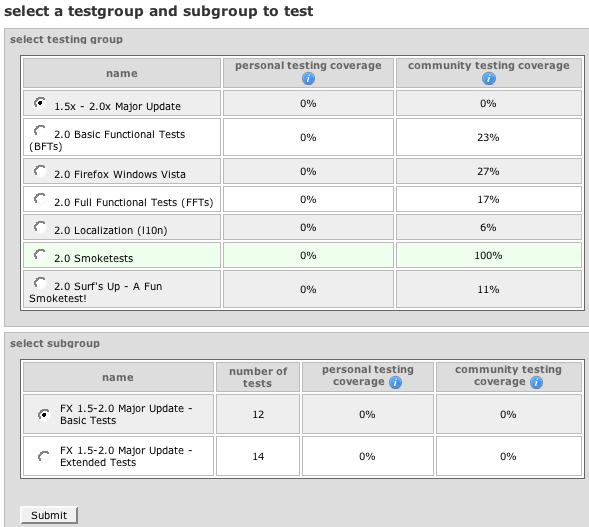
4. This takes you to a page where you can select what kind of tests you are interested in running might be:

Pick a test

5. Make your selection and here you go – a test to run:

run the test

Many of the tests are simple things that you might do anyway.

For the competitive out there, Club Moz president Anthony Hughes is currently the 4th highest tester with 3477 tests under his belt…does anyone want to give him a run for his money?