New Year, New To-Do list

Today was the first day back in the hallowed halls of S@Y. I managed to clear up the conflict signing up for DPS911 and am now officially registered.

I’ve gotten some great feedback on the bug I filed for the source server so there’s lots to get started on. First rewriting the patch better and then the grand task of writing a new pdbstr.exe that we can distribute because the Microsoft version cannot do so.

Anyway, that’s the short, glossy version.

I’m looking forward to getting back in the game. As the last few days of the holiday whip by I’m also working on some websites for friends, training to be a tutor in the Learning Center, helping some friends paint and trying to finish another pair of socks.

Yesterday at a New Year’s brunch I spent some time with a friend who has recently lost a large amount of her vision. She is almost (but not quite) legally blind and her vision will continue to deteriorate at an unknown rate. She’s a visual artist as well as a teacher and we had a lively discussion about software and adaptive technology. I’m determined to find a way to develop simple, well designed, as open source as possible programs for the Mac. This is a challenge since a) I have been informed that there is no money in writing adaptive software and b) apple development is a mystery to me and c) I’m not sure if it’s even possible to write open source programs for Apple.

Learning about this will be the sidebar on the to-do list for the winter you know, in my spare time 🙂

0.3 Release of the Source Server for Mozilla Firefox

Well, the big ball ‘O duct tape that is my hacks on symbolstore.py are complete for now – here is the patch. This project will be carried on in the next term at which point I hope to address some of the current issues, namely – manipulating the directory structure, cleaning up the python code and assembling a unified documentation page.

For now – you may test out the fruits of my labour by downloading this installer of Firefox 3.0b2pre which will install Minefield in your Program Files/Minefield directory (you have no choice for installation dir.) and then copying these symbols into the folder where your Visual Studio (or Windbg) is looking for debug symbols.

The last thing you have to do in order for this to work is to put a path to cvs.exe in your PATH – I personally pointed it to the mozilla-build/mysys/bin/cvs.exe but if you like you can download cvs.exe and put it wherever you want.

Now that you have all you need, open up your debugger (VS or Windbg), attach it to the Minefield process and go!

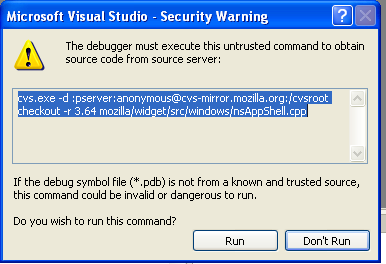
It will ask you about the cvs calls that gather up the source code, say “OK” or “Run” or whatever is positive. The file should download into the proper /mozilla/whatever structure – on my computer it goes into Program Files/Microsoft Visual Studio 8/Common7/IDE/mozilla/…

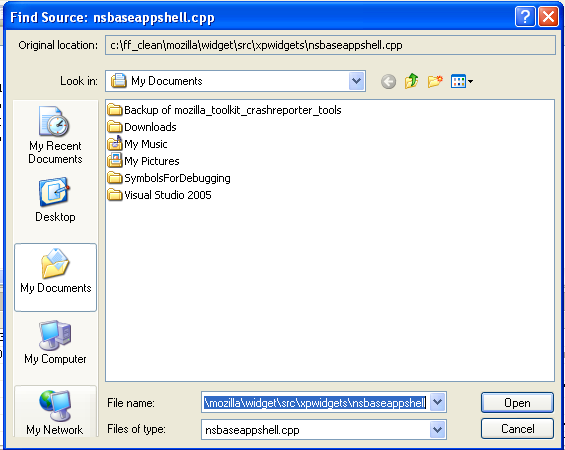
That will be a focus in the next round, is manipulating the cvs command so that the source files go to a c:/temp or something. The debugger will automatically want to look for the path that the source file originally came from (in this case, my c:/ff_clean/mozilla/…) – you will have to point your debugger to the correct file the first time and then after that it knows to look in the mozilla folder you selected.

It works for now like what it is; a ball of duct tape that allows you to get the right source code for where you are in the browser without having a build on your computer.

I look forward to feedback about how this works for you, if you use it and if you have any problems arise.

To the wall…

After many nights of tweaking this space, that path, this logic – the symbolstore.py script is now playing nice with pdbstr and the pdb files are getting indexed. So begins the second battle – how to get Visual Studio to pull the code out of CVS and locate that code on the local drive. Right now, when you have the symbols loaded up and you attach to firefox as a process, a window comes up confirming the call that will be made. Calling CVS from VStudio

If I copy and paste this command into my command line (I have CVS in my path from mozilla-buildmysysbin) then I can pull the file and it goes into the directory structure as it is in the command starting from my current working directory.

When I click on “Run” in Visual Studio however, the code may or may not be getting pulled from CVS – I have no feeback and if I then try to look at something on the call stack, I get a dialog asking me to find the source code file. BUT WHERE IS IT?
look for files
Visual Studio is trying to find it in the hierarchy that my build was based on…that is not going to exist on the remote user’s computer.

I’ve made a few tweaks to symbolstore.py to try and create a %CVS_WORKINGDIR% in the srcsrv data block where the code would then be pulled to. This does not appear to be working, as the directory I am instructing it to create is not getting created.

This is the current symbolstore.py. More tweaking on the horizon.

Many huge thanks to Ted for figuring out the minute details that fixed the call to pdbstr.

The most up to date set of symbols can be found here: http://avnerd.tv/symbols/crashreporter-symbols-firefox-3.0b2pre-WINNT-2007120422.zip

The installer for this indexed version is here: http://avnerd.tv/sharedFiles/ff_SourceServer.exe.zip