Ted’s visit

Learning from today’s class with Ted Mielczarek:

– lots of successful builds, so things are getting easier
– the error that we are getting about directory names with spaces is an advancement over the past when it just failed for an unknown reason
– there’s a bug right now with building on Vista, there’s a work-around right now
– VM is a great way to test in different environments (I have VMware, just need to get it going)
– ac options are for autoconf whereas mk options are for make
– a reminder to use an object directory with builds
– why client.mk? you can build mozilla without it – but it’s easier with client.mk – it handles the MOZ_CO_PROJECT stuff
– looking at tinderbox – not everyone is using tinderbox…lots of people use buildbot so it would be great to get more of the mozilla stuff into buildbot
– there’s work being done to get rid of autoconf – switch to python script instead
– talking about replacing make but not sure to what
– google-breakpad, a crash reporting system, integrated with mozilla
– demo of crashing, reporting the crash – bug reports (this is all still a little overwhelming)

And then a break.

– make -C
– mozconfig options for debugging:
ac_add_options –enable-debug (in optimizations)
– demo of searching code at lxr.mozilla.org

Final note – in order to do the Source server I apparently don’t have to be stellar at C++, phew!

Starting the Project – Mozilla Source and Symbol Server

Today we get to hear Ted Mielczarek speak on the Mozilla Build system. According to Dave, I will be communicating with Ted about the project I signed up for, the Mozilla Source and Symbol Server.

Let me say first of all that I chose this project because I know nothing about it. Let me emphasize this: NOTHING.

So, to get started – looking over the resources provided, reading up on what a source server is and what a symbol server is. I think that I need to see the symbol server in action so that I can know why a source server would be beneficial. This means I need to learn how people debug Mozilla.

Apparently you can debug both in VStudio and also in something called Windbg (which makes me think “windbag”). I have VStudio 2005 already installed and last year a fellow classmate showed me how to do some basic debugging of my C++ programs. At the time that was a huge breakthrough – to be able to see exactly how far into a function I could get, to see what a variable was set to was a huge help in figuring out where something was going terribly wrong.

I don’t know if debugging Mozilla is like this. I haven’t got it set up yet. My next goal is to find someone who can show me their debugging process. I learn best visually. So for now, I have just downloaded windbag…

Makefile experiment

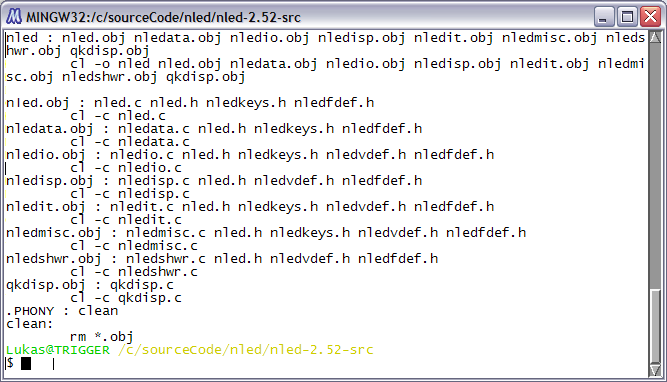
Okay, as per this week’s “To Do List” I followed the instructions and created a basic makefile for the nled editor. I haven’t used nled since first year, what a flashback.

Anyway, it was pretty simple. Not sure if I “cheated” by commenting out a tiny statement in the qkdisp.c file in the qb_beep function as follows:
/*#elif WIN95
MessageBeep(MB_OK);*/
#elif __OS2__

because I was getting an error about it.

In any case, the makefile looks like this:
makefile
and the end result? No .obj files left over when I ran it with the command — make && make clean —
as well…ta da!!
nled